Regex Capture

Extracts data from the provided text using Regex
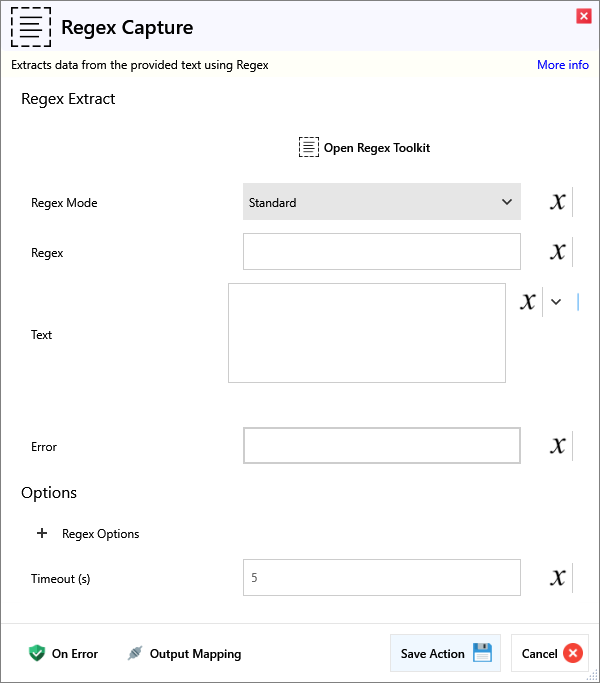
Input
Regex Extract
| Name | Required | Description |
|---|---|---|
| Regex Toolkit | ||
| Regex Mode | Regex mode to use. | |
| Regex | Regex pattern to use for extraction. | |
| Text | Text to extract data from. |
Options
Regex Options
Options
| Name | Required | Description |
|---|---|---|
| Global | If set all matches will be returned, otherwise just the first match will be returned. | |
| Ignore Case | Makes the matching case in-sensitive. | |
| Multi Line | If enabled, ^ and $ match the start/end of a line. Does not override Single Line mode, which makes dot '.' match every character. | |
| Single Line | Treats the Text as a single line, meaning dot '.' matches every character. (Instead of every character except new line '\n') | |
| Non Capturing | Aka ExplicitCapture - Groups are non capturing by default when this is set. | |
| Extended | Ignore whitespace in your regex, enables comments using #. | |
| Right to left | Perform matching from right to left. |
| Name | Required | Description |
|---|---|---|
| Timeout (s) | How long to search before giving up. |
Output
| Name | Required | Description |
|---|---|---|
| Action Success | True if the action passed, false if it failed. | |
| Capture Data | Table of all matches and captures found. | |
| First Match Value | The value of the first match. | |
| First Capture Value | The value of the captured text from the first match. | |
| Has Match | Returns 'True' if there are 1 or more matches |