Launch Chromium Browser

Opens new instance of a Web Browser.
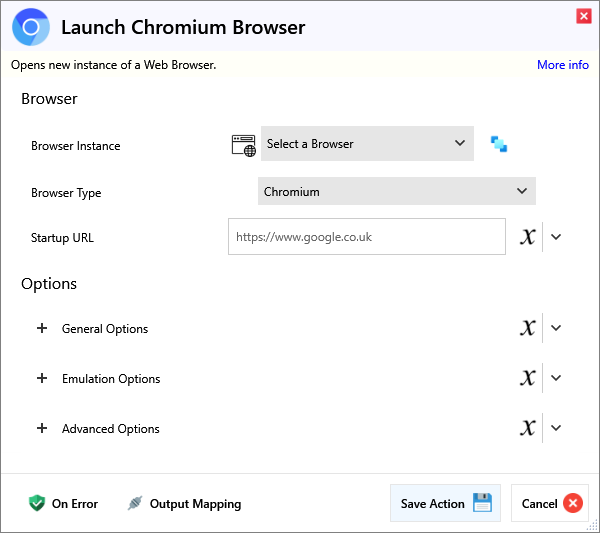
Input
Browser
| Name | Required | Description |
|---|---|---|
| Browser Instance | Which browser instance to run against. | |
| Browser Type | Which Browser rendering engine to use. | |
| Startup URL | (Optional) The URL to load when the browser opens, must include https:// or http://. |
Options
General Options
| Name | Required | Description |
|---|---|---|
| Headless | Hides the GUI while running if headless. | |
| Download Directory | Set the default download path for the browser. | |
| Browser Width | Custom browser width, default is 1280. | |
| Browser Height | Custom browser height, default is 920. | |
| Video Recording Enabled | If set, a video recording will be captured during the run. You must close the browser to save the sessions recording. | |
| Auto Screenshots Enabled | If enabled, each action with a target will take a screenshot of the element for visuals only. Not recommended, remember to turn off after Script creation. |
Emulation Options
| Name | Required | Description |
|---|---|---|
| Device Emulation | Pick a device from this list to emulate it, this overrides most other options like Viewport Size (Height/Width), User Agent, Has Touch etc. if set. You must pick the right browser type though, like iPhones use Webkit, Android generally Chromium.. |
Geolocation
| Name | Required | Description |
|---|---|---|
| Latitude | Latitude between -90 and 90. | |
| Longitude | Longitude between -180 and 180. |
| Name | Required | Description |
|---|---|---|
| Locale | User locale, for example en-GB, de-DE, etc. Locale will affect navigator.language, Accept-Language request header value, number and date formatting rules. | |
| Timezone | Sets the timezone, view documentation or google 'icu timezone names' to see the options. | |
| UserAgent | Set the UserAgent for this browser context. | |
| Colour Scheme | Choose between light or dark mode. | |
| Mobile Mode | The 'meta viewport' tag is taken into account and touch events are enabled. Not supported in Firefox. | |
| Touchscreen Enabled | Enable this option if you need to use the Tap Action to simulate touchscreen events. | |
| Device ScaleFactor | Set the device scale factor (can be thought of as Device Pixel Ratio). | |
| Offline Mode | Emulates the browser not being connected to the internet. |
Advanced Options
| Name | Required | Description |
|---|---|---|
| Disable Javascript | Disables Javascript in the browser. | |
| Bypass CSP | Toggles bypassing page's Content-Security-Policy. | |
| Ignore HTTPS Errors | Whether to ignore HTTPS errors when sending network requests. | |
| Reduced Motion | Emulates 'prefers-reduced-motion' media feature, supported values are 'reduce', 'no-preference'. | |
| Args | Args to be passed to the browser at launch. | |
| Auto Install Browsers | Option to disable the check that auto installs your browsers, only reccomended if you are sure the browsers are there like running in an unusual environment like AWS Lambda. | |
| Excluded Default Args | Any default args that match the user defined list of args will be excluded from the browser. |
Settings
| Name | Required | Description |
|---|---|---|
| Proxy Server | Proxy to be used for all requests. |
Output
| Name | Required | Description |
|---|---|---|
| Action Success | True if the action passed, false if it failed. |