Press Keys

Simulates pressing keys, allows for special keys and combinations Eg. Control+A.
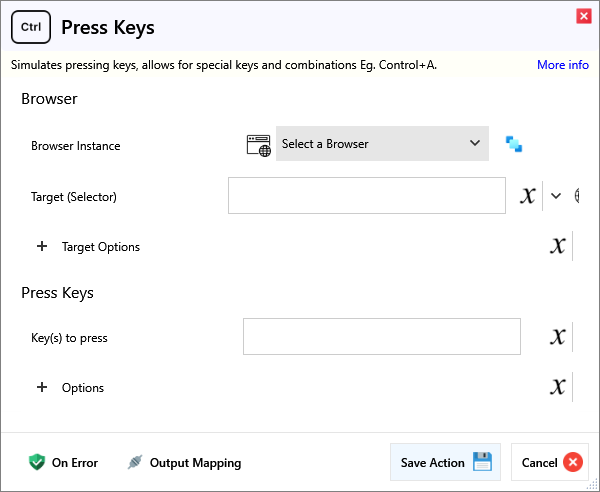
Input
Browser
| Name | Required | Description |
|---|---|---|
| Browser Instance | Which browser instance to run against. | |
| Target (Selector) | A Selector string that targets a specific element on the web page. |
Target Options
| Name | Required | Description |
|---|---|---|
| Match Type | Match Text either behaves as Regex or a simple Contains text check. | |
| Match Text | Matches elements that either contain this or match the regex somewhere inside the selected element, possibly in a child or a descendant element. | |
| Match Index (Nth) | (Optional) Target the Nth instance of the element. Eg. For 2 of the same element, use an Index of 0 to match the First and 1 to match the Second. | |
| Frame Target (Selector) | (Optional) Specify a Frame Selector, for example to first target an iframe before the primary Target. |
Press Keys
| Name | Required | Description |
|---|---|---|
| Key(s) to press | The keys that will be pressed. See Documentation for examples. |
Options
| Name | Required | Description |
|---|---|---|
| Timeout (ms) | How long to wait in milliseconds for a successful click. Default is 30s. |
Advanced Options
| Name | Required | Description |
|---|---|---|
| Key Release Delay (ms) | How long to wait in milliseconds between Key down and Key up, how long to hold keys for. | |
| Prevent Wait | Enable only if you must avoid waiting for navigation when it is required by certain web page actions to start their page loading, only required in exceptional situations like navigating to inaccessible pages. |
Output
| Name | Required | Description |
|---|---|---|
| Action Success | True if the action passed, false if it failed. |