Click Image (Experimental)
Searches for an image on the page, and clicks the center of it, if found. The page flickering while searching is normal.
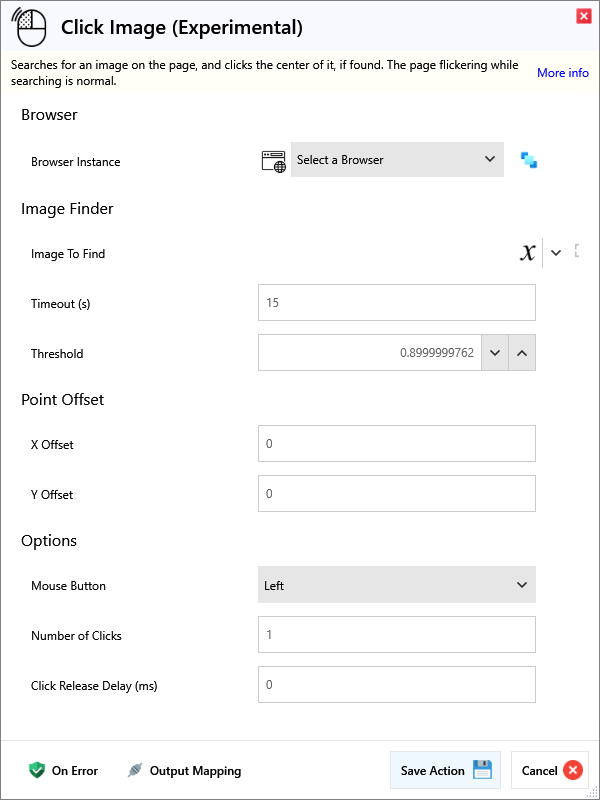
Input
Browser
| Name | Required | Description |
|---|
| Browser Instance | | Which browser instance to run against. |
Image Finder
| Name | Required | Description |
|---|
| Image To Find | | The image to search for on the page. |
| Timeout (s) | | How long to keep looking for the image on the page before giving up. |
| Threshold | | Threshold value for image match confidence, between 0 and 1. |
Point Offset
| Name | Required | Description |
|---|
| X Offset | | X Offset to apply from the centre of the found location. |
| Y Offset | | Y Offset to apply from the centre of the found location. |
Options
| Name | Required | Description |
|---|
| Mouse Button | | Which mouse button you want to click with. Default is Left. |
| Number of Clicks | | How many times you want to click the element. Default is 1. |
| Click Release Delay (ms) | | How long to wait in milliseconds after clicking to release the mouse button. |
| Scan Full Page | | Allows auto scrolling to search for the image. This may cause flickering in the page. |
Output
| Name | Required | Description |
|---|
| Action Success | | True if the action passed, false if it failed. |
