Function Call

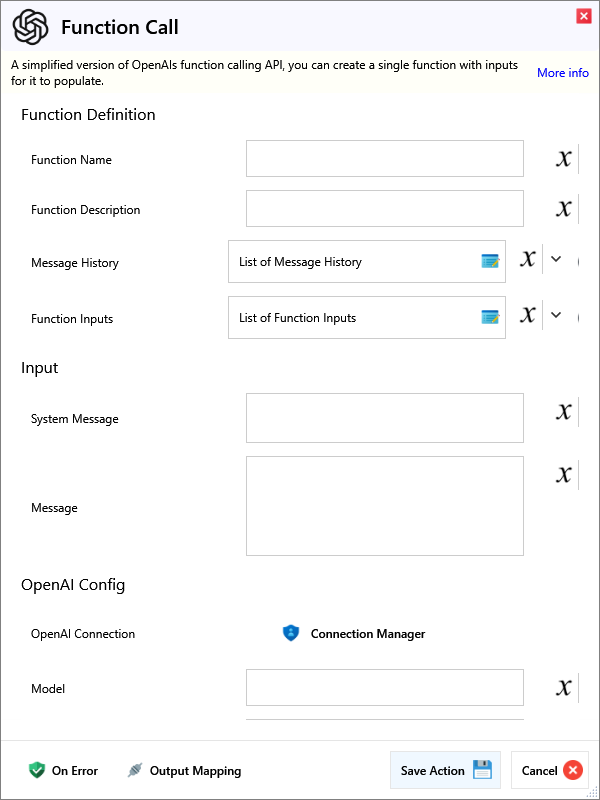
A simplified version of OpenAIs function calling API, you can create a single function with inputs for it to populate.
Input
Function Definition
| Name | Required | Description |
|---|---|---|
| Function Name | Name of the function (No spaces or special characters allowed). | |
| Function Description | Description of the function's purpose. | |
| Message History | Message history to help the model understand it's behaviour. | |
| Function Inputs | The available inputs for your function. |
Input
| Name | Required | Description |
|---|---|---|
| System Message | (Optional) System message to provide general instruction. | |
| Message | User prompt to provide text for the function. |
OpenAI Config
| Name | Required | Description |
|---|---|---|
| OpenAI Connection | ||
| Model | Enter a valid model to be used. (See OpenAI API Docs) | |
| Max Output Tokens | Maximum number of tokens for the output, make sure this combined with your input does not exceed the models limit. This also limits reasoning tokens for o1-preview, o1-mini, etc. | |
| Set a base delay timeout (ms) | Set base delay to wait, before doing another request. | |
| Max Retries | Maximum number of requests to send, before stopping. |
Advanced Options
Advanced Configuration
| Name | Required | Description |
|---|---|---|
| Temperature | Sampling temperature between 0 and 2. Higher values make the output more random, while lower values make it more focused and deterministic. | |
| Presence Penalty | Number between -2.0 and 2.0. Positive values penalize new tokens based on their presence in the text so far, encouraging new topics. | |
| Frequency Penalty | Number between -2.0 and 2.0. Positive values penalize new tokens based on their frequency in the text so far, reducing repetition. | |
| Stop Sequences | Up to 4 sequences where the API will stop generating further tokens. The returned text will not contain the stop sequence. | |
| Top P | Nucleus sampling alternative to temperature. Considers tokens with top_p probability mass. For example, 0.1 means only tokens in the top 10% probability mass are considered. | |
| Logit Bias | JSON object mapping token IDs to bias values (-100 to 100) to modify the likelihood of specified tokens appearing in the completion. Eg. {2435:-100, 640:-100} |
Output
| Name | Required | Description |
|---|---|---|
| Action Success | True if the action passed, false if it failed. | |
| Function Output | The inputs found/generated to call your function. | |
| Status Code | The HTTP status code of the response. | |
| Request Success | True if the request was successful. | |
| Error Message | The error message for an unsuccessful request. |