Get Email

Retrieves the specified email and downloads any attachments
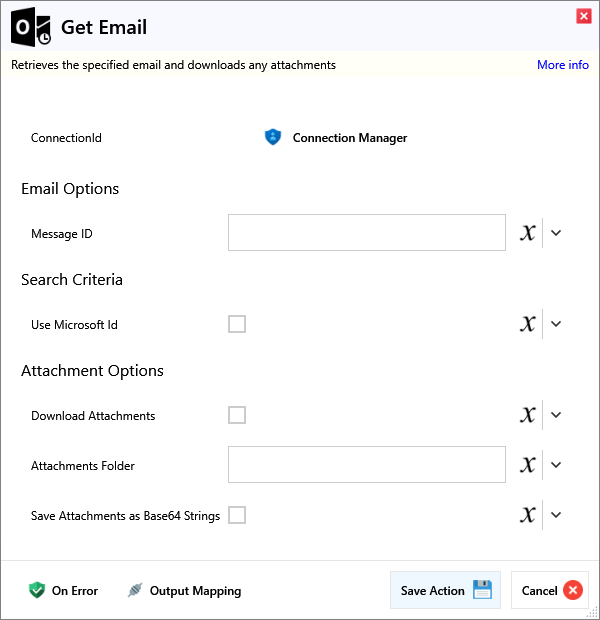
Input
Email Options
| Name | Required | Description |
|---|---|---|
| Message ID | The ID of the email to retrieve. |
Search Criteria
| Name | Required | Description |
|---|---|---|
| Use Microsoft Id | If checked, the Microsoft Id associated with the email will be used rather than the Message ID . |
Attachment Options
| Name | Required | Description |
|---|---|---|
| Download Attachments | If checked, any attachments will be downloaded to the specified folder, and their paths written to the output | |
| Attachments Folder | The local folder that any attachments will be saved to | |
| Save Attachments as Base64 Strings | If checked, any attachments will be appended to the output as Base64 strings in place of a downloaded file path. The files will not be downloaded to the file system, but will be kept in memory |
Output
| Name | Required | Description |
|---|---|---|
| Action Success | True if the action passed, false if it failed. |
|Graph Message ID| |The Microsoft Graph Message ID of the email| |Message ID| |The Mime Message-ID of the email.| |Subject| |The Subject of the email| |Message Body| |The message body| |From| |The address of the sender| |To| |The recipients of the email| |CC'd Recipients| |The CC'd recipients of the email| |BCC'd Recipients| |The BCC'd recipients of the email| |Date Time Created| |The time the email was created, with a timezone offset| |Date Time Received| |The time the email was received, with a timezone offset| |Is Read?| |Returns true if the email has been marked as read| |Attachments| |The data of any attachments to the email.|